Tech Zone
Need help configuring email on your computer or mobile device? Click here!
Please read!
Wireless Router Selection:
With the advent of smart home devices we are seeing more and more people purchasing “whole home wi-fi” solutions such as the Netgear Orbi or Google Wi-Fi in an attempt to reach every nook and cranny throughout their home with wireless service. We would recommend against this as these systems are not always configurable and will oftentimes create interference on the wireless channels we use to provide service to your home. If you are a customer and are interested in extending your wi-fi network please talk to us and we will provide a solution that will not only work better but allow us to mitigate any interference with our own equipment. We cannot be responsible for poor connections due to misconfigured wireless equipment in your home that we did not provide. That being said we highly recommend all customers purchase a router from us so that we are not only familiar with it but can also warrant it for the duration of your service. Thank you!
Standard DNS Servers:
(Our DNS server)
64.146.180.226
(Our other DNS server)
64.146.180.227
(Google DNS)
8.8.4.4
(Level 3 DNS)
4.2.2.1
Content Filtering DNS
OpenDNS provides a free content filtering DNS server in order to help parents limit their children’s access to harmful internet sites. Using a content filtering resolver may also be able to help with some categories of unwanted p2p filesharing activity trying to use your connection. You can use this value as the DNS Server in the network settings of your child’s device or computer. Disclaimer: Nikola Broadband has no disposition on the accuracy, inaccuracy, or privacy issues involved when using a content filter as provided by 3rd party service.
(OpenDNS FamilyShield DNS)
208.67.222.123
Recommended Downloads:
E-Mail Client:
Mozilla Thunderbird
Links:
Wikipedia Entry on Nikola Tesla
The History of Spread Spectrum
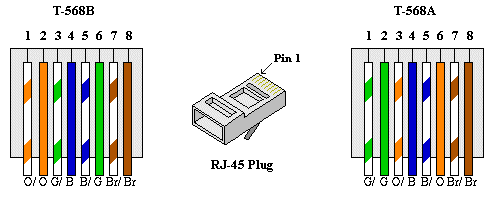
Color Codes for 8P8C RJ-45 Ethernet Plug:
Eight-conductor data cable (Cat 3, Cat 5 or Cat 6) contains 4 pairs of wires. Each pair consists of a solid color wire and a white and color striped wire. Each of the pairs are twisted together. To maintain reliability on Ethernet, you should not untwist them any more than necessary (about 1/4 inch).
The pairs designated for 10BaseT Ethernet are orange and green. The other two pairs, brown and blue, are unused. The connections shown are specifically for an RJ45 plug. The wall jack may be wired in a different sequence because the wires may be crossed inside the jack. The jack should either come with a wiring diagram or at least designate pin numbers that you can match up to the color code below.